
Attendance
Permission-based updates
Record attendance for assigned classes. Authorised management users can make supported attendance corrections.
Free School Management Software
Manage your school's daily operations with MasterSuite Desktop and access supported school information and tasks through MasterSuite Companion for Android.
100% free offline school management software for Windows. Companion is a preview/testing release for authorised users of a compatible school Host.
MasterSuite Desktop 1.0.2Build 2026.10.17.01Stable
MasterSuite Desktop 1.0.2Build 2026.10.17.01Stable
MasterSuite Desktop · Your Primary School Host
One free school management system for school owners, administrators and teachers. Desktop is the primary system for student management, finance, assessments, attendance, staff, payroll, timetables and communication, with offline tools for everyday school operations.
For Android · Preview / testing release
Your school's supported tasks and information, on your Android phone. Connect to an authorised MasterSuite Desktop Host and work within the permissions assigned to your account.
APK · Version 1.0.1
Permission-based updates
Record attendance for assigned classes. Authorised management users can make supported attendance corrections.
Supported workflows
Work with supported scores and assessment tasks for your assigned classes and subjects, as permitted by the school.
Read and authorised publishing
Read school notices. Users with the appropriate management permission can prepare notices for publishing on sync.
Read only
View the student information available to your account. General student record editing remains on Desktop.
Read only
View permitted staff information. Staff records and payroll processing remain on Desktop.
Read only
Authorised users can view supported financial information. Mobile fee collection and payment processing are not included.
Authorised roles
Pair through the school Desktop Host. Permitted management users can review devices and request supported access changes.
School-controlled permissions
The Host controls which information and actions each account can access. A mobile sign-in does not grant unrestricted administration.
Desktop is the primary Host and source of school records. Pairing, authentication and current permissions are required. Connect through the school's authorised network; this is not a cloud-hosting service or a promise of worldwide access.
Current online-only management information needs a connection to the Host. Supported attendance and assessment changes can be queued while your local session remains valid. Reconnect, use Sync Now and resolve any conflicts; offline work does not bypass Host permissions.
Getting Connected
Your school administrator controls Host access and device pairing.
Install the approved MasterSuite Desktop release on the school’s authorised Windows computer. Back up existing school data before upgrading.
Download MasterSuite Companion using the official Android link and open the APK on your phone. A compatible MasterSuite Desktop Host is required.
An authorised administrator opens MasterSuite Companion on Desktop and selects Pair New Device. On the phone, choose Scan QR Code. If scanning is unavailable, choose Enter Pairing Code and use the connection details supplied privately by your administrator.
Use the account assigned by your school. Keep the phone connected to the authorised school network while pairing and signing in.
Sync the information your account is allowed to access. Check Sync Status and resolve pending changes or conflicts when reconnecting to the Host.
If Android asks, allow APK installation only for the browser or Files app you used for this download, then turn that permission off afterward. Keep Play Protect and other security protections enabled. If Android reports a security concern, stop and contact support.
Latest Stable Release
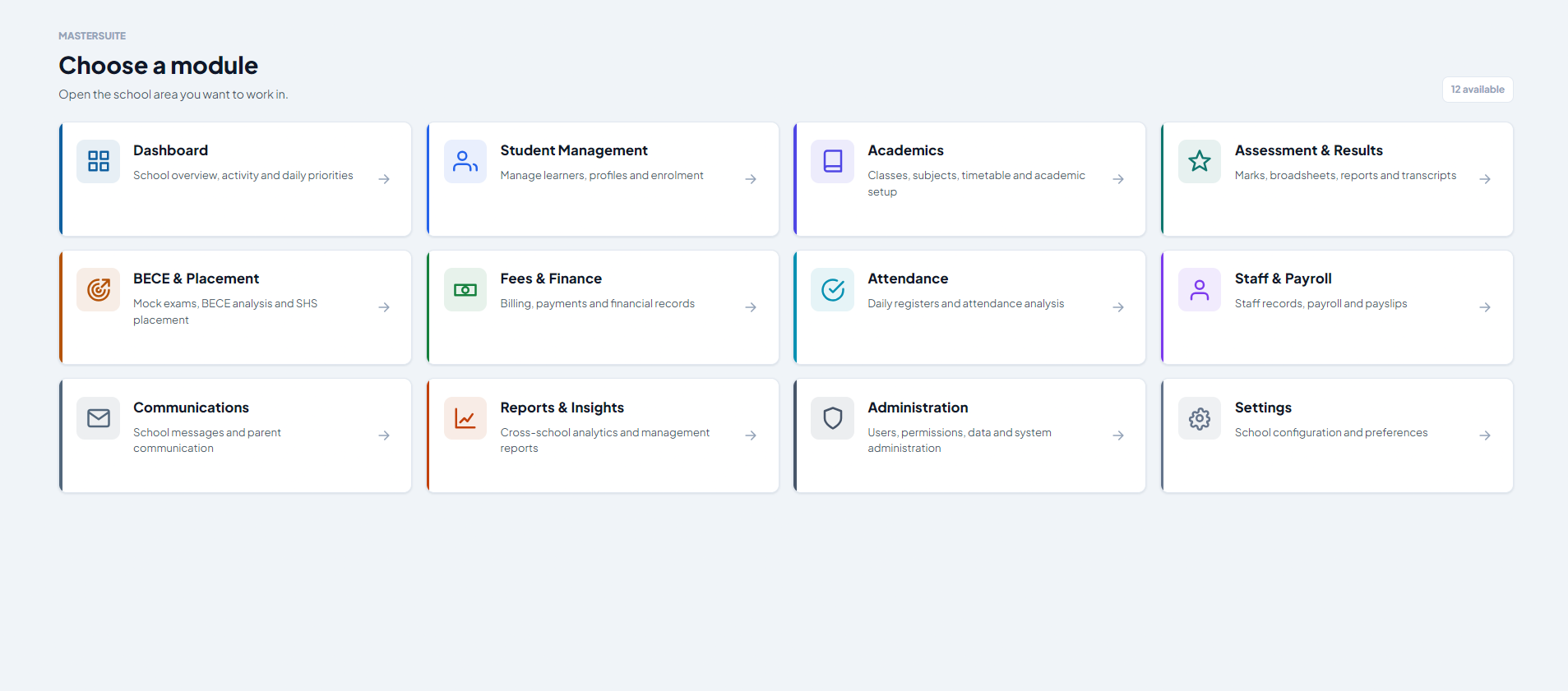
See MasterSuite in Action
Explore the real MasterSuite Module Launcher. Open the preview for a closer look at the school management modules.
Why Choose MasterSuite
Runs on the school computer and does not depend on constant internet.
Designed around real school administration workflows.
Clean and familiar interface for school staff.
MasterSuite desktop software is free to use.
MasterSuite is developed and continuously improved based on feedback from schools using it in real working environments.
Our support team is available to help schools with installation, activation and general support.
Run your school on Windows and connect authorised Android users with MasterSuite Companion. Choose your download below.
Latest Stable Release
MasterSuite Desktop 1.0.2
Build 2026.10.17.01 • Stable
Build date 17 October 2026
Windows · 100% Free Download
Android APK · Preview/testing release · Compatible school Host required
Already using MasterSuite?
Back up your school data before upgrading to Build 2026.10.17.01. Keep the existing installation and its data; do not uninstall MasterSuite or delete school records as part of a normal upgrade.
This Windows installer is not digitally signed. Use the official download and contact support if Windows reports a security concern; do not disable your security protections. Ask support to confirm compatibility with your computer.
MasterSuite-Setup-1.0.2-Build-2026.10.17.01.exe
SHA-256:
73969C0D9B35F11B12E4C94F7747DB4898A55C2261BE4D4C1C5BF9F462A7008E